Introduction
Human resources data plays an important role across an enterprise. Employee information affects payroll, finance, organizational planning, procurement, access management, reporting, and day-to-day business operations.
However, this information is often distributed across multiple systems.
An organization might use SAP SuccessFactors for core HR processes, SAP S/4HANA for enterprise operations, and other applications for payroll, recruitment, employee services, and reporting. If these systems do not exchange information correctly, HR and IT teams may need to manage duplicate records, manual updates, and disconnected workflows.
SAP SuccessFactors integration helps enterprises connect HR applications with SAP and other business systems so that employee information and related processes can work together.
SAP provides documented integration scenarios for SAP SuccessFactors Employee Central with SAP S/4HANA and SAP ERP HCM, including employee master data, organizational assignments, cost centers, and time-related data. The correct approach depends on the target SAP system and the organization’s deployment model. SAP Help Portal
The objective is not simply to synchronize employee records. It is to create a reliable connection between HR data and the business processes that depend on it.
Quick Answer: What Is SAP SuccessFactors Integration?
SAP SuccessFactors integration is the process of connecting SAP SuccessFactors applications with SAP ERP, SAP S/4HANA, payroll systems, and other enterprise applications to exchange relevant data and coordinate business processes.
Common integration scenarios include:
- Employee master data replication
- Organizational structure synchronization
- Cost center integration
- Employee onboarding and offboarding
- Time and attendance data exchange
- Payroll-related integration
- Employee and business partner synchronization
- HR reporting and analytics
- Cross-system HR workflows
Depending on the scenario, integration can use SAP-provided integration content, supported APIs, middleware, or other appropriate connectivity methods.
Why Do Enterprises Need SAP SuccessFactors Integration?
An HR platform rarely operates in isolation.
Employee information can affect several departments, and each department may depend on different applications.
Without integration, organizations can face the following challenges.
1. Duplicate Employee Data
HR teams may update employee details in one system while another application continues using an older record.
This can lead to inconsistent information across HR, payroll, finance, and operational systems.
2. Manual Data Transfer
Teams may need to export spreadsheets, upload files, or manually update records across applications.
These activities increase administrative effort and can introduce errors.
3. Delayed Employee Onboarding
When employee information does not reach the relevant systems on time, downstream processes may be delayed.
For example, an employee’s organizational assignment may need to be reflected in systems used for payroll, reporting, or internal operations.
4. Inconsistent Organizational Structures
Departments, positions, managers, and cost centers need to remain consistent across systems that depend on them.
Without defined synchronization rules, organizational changes can create discrepancies.
5. Limited Process Visibility
HR teams may not have a clear view of whether employee information has reached the systems that depend on it.
A well-designed integration process should provide monitoring and a clear approach to resolving failed transactions.
What Is SAP SuccessFactors Employee Central?
SAP SuccessFactors Employee Central is the core HR component used to manage employee and organizational information.
Depending on the implementation, it can maintain information such as:
- Employee records
- Employment details
- Job information
- Organizational assignments
- Reporting relationships
- Position information
- Employment changes
Employee Central can serve as the system of record for employee data in an organization’s selected HR architecture.
For example, in a core hybrid deployment, Employee Central may own employee master data while certain payroll, time management, or other HR processes continue to run in an SAP S/4HANA or SAP ERP environment. SAP Help Portal
This distinction matters because integration design must reflect which system owns the data and which systems consume it.
Common SAP SuccessFactors Integration Use Cases
1. Employee Master Data Replication
Employee master data replication transfers relevant employee information between Employee Central and an SAP system.
Depending on the scenario, this can include employee identifiers, employment information, and organizational assignments.
A typical flow is:
SAP SuccessFactors Employee Central → Integration Layer → SAP S/4HANA or SAP ERP
The receiving system processes the incoming data according to its configuration and business rules.
SAP documents standard employee and organizational data replication scenarios for supported SAP S/4HANA and SAP ERP landscapes. SAP Help Portal
2. Organizational Data Integration
Employee information is closely connected to organizational structures.
Examples include:
- Departments
- Positions
- Reporting relationships
- Organizational units
- Cost centers
When organizational information changes, relevant systems may need to receive those changes.
The integration design should specify which system owns each organizational object and the direction in which changes are replicated.
3. Cost Center Integration
Cost centers are important for financial reporting, organizational planning, and cost allocation.
In some integration scenarios, cost centers are maintained in SAP S/4HANA or SAP ERP and replicated to Employee Central.
This can help HR teams use the relevant organizational and financial structures without maintaining conflicting records manually.
The direction and scope of cost center replication depend on the selected architecture. SAP Help Portal
4. Employee Onboarding
Onboarding may require employee information to reach several systems.
A connected process can support activities such as:
- Creating employee records
- Assigning organizational information
- Providing information to payroll systems
- Triggering internal service workflows
- Updating relevant business applications
Integration does not automatically perform every onboarding task. Each system and workflow must be configured to handle its assigned responsibilities.
5. Employee Offboarding
When an employee leaves an organization, the departure may affect multiple systems.
Depending on the enterprise’s architecture, the process can involve employee status updates, payroll processing, asset recovery, access-related workflows, and reporting.
A coordinated integration approach can reduce the number of manual handoffs between HR and other departments.
6. Time Data Integration
Some organizations maintain employee core data in Employee Central while continuing to use SAP systems for time management or payroll-related processes.
SAP documents point-to-point time data replication scenarios involving Employee Central and supported SAP payroll or ERP systems. SAP Help Portal
The appropriate integration method depends on the target system, supported scenario, and business requirements.
7. Payroll Integration
Payroll integration requires particular attention because employee data and time-related information can affect salary calculations.
Depending on the landscape, an integration may exchange employee master data, organizational assignments, time information, or other required payroll inputs.
Before implementation, teams should confirm which system is responsible for payroll processing, which data must be transferred, and how errors will be handled.
8. HR Data Integration With Other Enterprise Applications
Employee information may also be needed by applications outside the SAP HR landscape.
Examples include:
- IT service management
- Identity and access management
- Expense management
- Learning platforms
- Workforce analytics
- Enterprise reporting
Not every application needs a full employee record. The integration should transfer only the data required for its business purpose.
SAP SuccessFactors Integration Architecture
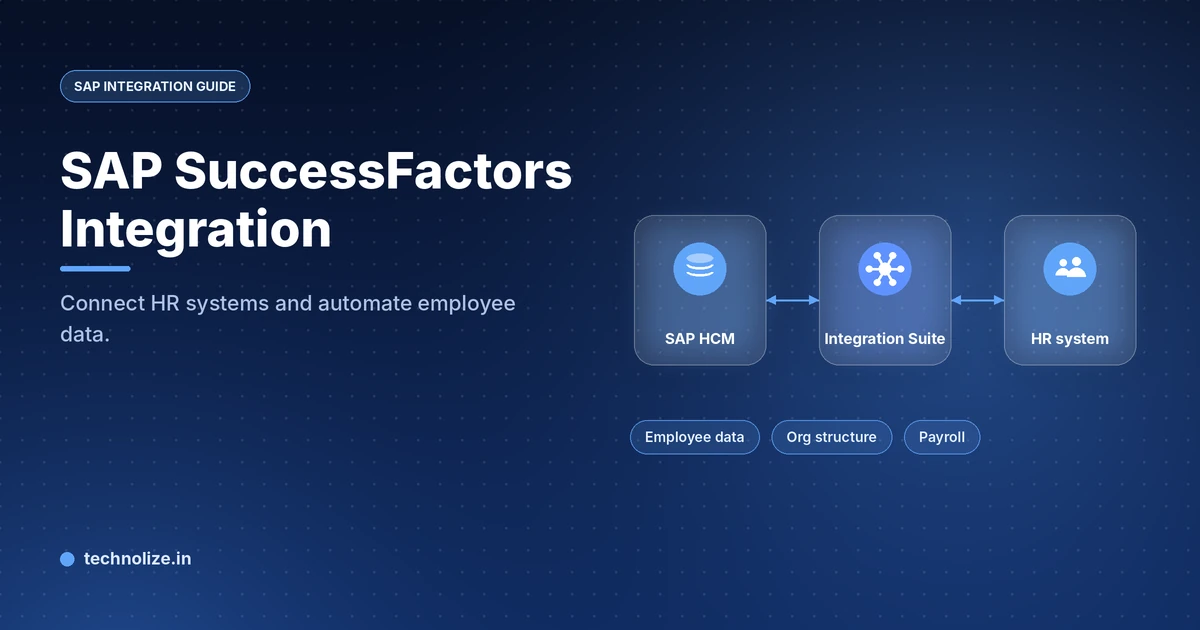
A typical architecture may include three main components:
SAP SuccessFactors Employee Central
Maintains relevant HR data and initiates or provides information for supported integration scenarios.
Integration Layer
Handles connectivity, message processing, transformation, and communication between systems.
SAP S/4HANA, SAP ERP, or Other Target Applications
Receive and process the information according to their business rules.
SAP Integration Suite, including Cloud Integration, can support appropriate integration scenarios between SAP SuccessFactors and SAP systems. SAP also provides scenario-specific integration content and implementation guidance. SAP Learning
The exact architecture should be selected after confirming the SAP product editions, supported integration methods, data requirements, and existing middleware.
How SAP Integration Suite Supports SuccessFactors Integration
SAP Integration Suite provides capabilities for connecting applications and coordinating data exchange across cloud and hybrid environments.
Depending on the selected integration scenario, Cloud Integration can support:
- Connecting source and target systems
- Processing integration messages
- Transforming data
- Handling communication between applications
- Applying integration logic
- Managing errors
- Monitoring integration execution
SAP provides integration packages and integration flows for supported Employee Central and SAP ERP or SAP S/4HANA data replication scenarios. SAP Learning
However, enterprises should not assume that every SuccessFactors integration requires a custom integration flow. The project should first assess available standard integration content and supported native integration options.
Choosing the Right Integration Approach
The right method depends on the source system, target system, and business scenario.
| Integration Requirement | Approach to Evaluate |
| Employee Central to supported SAP ERP or S/4HANA systems | SAP-provided employee data replication scenarios |
| Simple scheduled exports | SAP SuccessFactors Integration Center, where suitable |
| Custom application integration | Supported APIs and appropriate middleware |
| Complex transformation or orchestration | SAP Integration Suite Cloud Integration, where appropriate |
| Time data exchange | Supported time replication scenario for the target system |
| Integration with S/4HANA Cloud Public Edition | The supported integration approach for that edition, including SAP Master Data Integration where applicable |
SAP SuccessFactors Integration Center supports the creation, scheduling, and monitoring of certain file-based and web-service-based integrations. Its capabilities and supported directions should be checked against the exact requirement. SAP Help Portal
Important: Integration options differ across SAP S/4HANA editions. For example, SAP’s documentation distinguishes certain Employee Central integration add-ons for on-premise and private cloud environments from the approach used for SAP S/4HANA Cloud Public Edition. Confirm the supported architecture before selecting a solution. SAP Help Portal
Defining the System of Record
One of the most important integration decisions is determining which system owns each data object.
For example:
| Data Object | Possible System of Record |
| Employee core information | SAP SuccessFactors Employee Central |
| Organizational assignments | Depends on the selected HR architecture |
| Cost centers | SAP S/4HANA or SAP ERP |
| Payroll results | Designated payroll system |
| Time records | Designated time management system |
| IT service requests | ServiceNow or another service management platform |
These are examples, not universal rules.
If two systems can independently change the same information without clear ownership rules, conflicting updates can occur.
The integration design should specify:
- Which system creates each record
- Which system can update it
- Which changes must be replicated
- Which fields are mandatory
- How conflicting updates are handled
- What happens when replication fails
Data Mapping and Transformation
Different systems may represent the same business information in different ways.
For example, an organizational assignment in Employee Central may need to map to a corresponding organizational object in SAP.
Integration design may need to account for:
- Employee identifiers
- Employment status
- Organizational units
- Position identifiers
- Cost centers
- Country-specific fields
- Date formats
- Code values
- Mandatory fields
SAP’s Employee Central integration documentation covers mapping and value conversion for supported replication scenarios. SAP Help Portal
Mapping rules should be documented, tested, and maintained as the organization’s HR structure changes.
Security and Employee Data Protection
Employee information requires careful access control.
A production integration should consider:
- Authentication
- Authorization
- Role-based access
- Credential management
- Encryption
- Data minimization
- Audit logging
- Retention requirements
- Country-specific privacy obligations
- Secure handling of failed messages
Not every receiving application needs access to every employee field.
For example, an application that needs an employee’s organizational unit may not need access to salary information.
The integration should transfer only the information required for the intended business process and follow the organization’s security policies.
Monitoring and Error Handling
Successful data transfer is only one part of a reliable integration.
The process must also detect and resolve failures.
Common issues include:
- Invalid employee data
- Missing mandatory fields
- Incorrect organizational assignments
- Invalid cost center values
- Authentication failures
- API or connectivity errors
- Duplicate records
- Target-system unavailability
- Mapping failures
A practical operational process is:
Detect → Log → Investigate → Correct → Reprocess → Validate
The team should define who owns failed transactions, how they are corrected, and how successful reprocessing is confirmed.
SAP provides data replication monitoring and troubleshooting guidance for supported Employee Central integration scenarios. SAP Help Portal
SAP SuccessFactors Integration Implementation Roadmap
Phase 1: Understand the HR Landscape
Identify the HR systems, payroll applications, ERP platforms, and other applications that depend on employee data.
Document the current data flows and manual processes.
Phase 2: Define the Business Requirements
Confirm which data needs to be exchanged and why.
Identify the required employee objects, organizational information, time data, and business processes.
Phase 3: Confirm System Ownership
Establish the system of record for each data object and define which system is responsible for creating, updating, and validating information.
Phase 4: Select the Integration Approach
Evaluate standard SAP integration content, supported APIs, Integration Center, SAP Integration Suite, and other appropriate options.
Confirm compatibility with the specific SAP product editions in use.
Phase 5: Design Mapping and Security
Define field mappings, value conversions, authentication, authorization, data validation, and error-handling requirements.
Phase 6: Develop and Configure
Configure the relevant integration content and connections. Implement custom logic only where required.
Phase 7: Test End to End
Test successful and unsuccessful scenarios, including employee changes, organizational updates, invalid data, and connectivity failures.
Validate the results with HR, payroll, and relevant business teams.
Phase 8: Deploy and Monitor
Deploy using controlled release procedures, monitor replication, document operational responsibilities, and establish a process for resolving failures.
Common SAP SuccessFactors Integration Mistakes
Integrating Before Defining Data Ownership
Without clear ownership, employee records can become inconsistent across systems.
Assuming Every Integration Is the Same
Available methods vary by target system, deployment model, and business scenario.
Rebuilding Standard Functionality
Review SAP-provided integration content before creating custom integrations.
Ignoring Organizational Data
Employee records often depend on positions, departments, reporting relationships, and cost centers.
Transferring Unnecessary Employee Information
Data access should be limited to what each target process actually needs.
Underestimating Testing
Employee data issues can affect payroll, reporting, and downstream business processes.
Ignoring Monitoring
Failed transactions need clear ownership and a documented recovery process.
Failing to Document the Integration
Mapping rules, dependencies, credentials management, and support procedures should be documented and maintained.
How to Measure Integration Success
Enterprises should define measurable outcomes before implementation.
Useful indicators include:
- Employee data replication success rate
- Number of failed transactions
- Time required to resolve replication errors
- Number of manual data corrections
- Duplicate employee records
- Time taken to reflect approved employee changes
- Percentage of documented data mappings
- Number of recurring integration incidents
- Manual effort required to maintain HR data
The goal is not simply to exchange more data. It is to make HR information more reliable and reduce unnecessary manual work.
SAP SuccessFactors Integration Checklist
Before starting a project, confirm:
- The source and target systems are identified.
- The supported integration scenario is confirmed.
- The system of record is defined for each data object.
- Employee and organizational data requirements are documented.
- Standard SAP integration content has been reviewed.
- Data mappings and value conversions are defined.
- Security and access requirements are documented.
- Error handling and monitoring are planned.
- Payroll and time dependencies are understood.
- End-to-end testing scenarios are prepared.
- HR and technical owners are identified.
- Production support responsibilities are established.
FAQs
What is SAP SuccessFactors integration?
It connects SAP SuccessFactors applications with SAP and other enterprise systems so that employee data and related business processes can work together.
Can SAP SuccessFactors integrate with SAP S/4HANA?
Yes. SAP provides documented Employee Central integration scenarios for supported SAP S/4HANA editions. The appropriate method depends on whether the target is on-premise, private cloud, or public cloud. SAP Help Portal
Can SAP SuccessFactors integrate with SAP ERP HCM?
Yes. SAP documents integration scenarios involving Employee Central and SAP ERP HCM, including supported employee, organizational, and time data scenarios. SAP Help Portal
What data is commonly exchanged?
Common examples include employee master data, organizational assignments, cost centers, and time-related information. The exact scope depends on the business requirements.
Is SAP Integration Suite required for every SuccessFactors integration?
No. The appropriate approach depends on the scenario. Enterprises should evaluate SAP-provided integration content, supported native capabilities, Integration Center, APIs, and SAP Integration Suite before deciding.
Can SAP SuccessFactors integration automate employee onboarding?
It can support onboarding by exchanging employee and organizational data with downstream systems. Additional workflow configuration may be required for access management, asset allocation, payroll, and other activities.
How is employee data kept consistent across systems?
Organizations need clear system-of-record rules, defined field mappings, validation, monitoring, and a process for handling failed or conflicting updates.
How long does SAP SuccessFactors integration take?
The timeline depends on the number of systems, data objects, complexity of mapping, existing integration infrastructure, security requirements, and testing scope. A clearly defined pilot can help establish a realistic delivery plan.
Final Thoughts
SAP SuccessFactors integration helps enterprises connect HR data with the systems that depend on it.
When employee information is maintained across separate platforms, manual updates and inconsistent records can create unnecessary administrative effort. A well-designed integration can coordinate employee data replication, organizational updates, payroll-related information, and other HR processes.
The most important decisions are not limited to selecting a technical connection. Enterprises must also define data ownership, choose a supported integration approach, protect employee information, and establish reliable monitoring.
A practical approach is:
Assess the HR landscape → Define data ownership → Select the integration method → Configure and test → Deploy → Monitor and optimize
For organizations using SAP SuccessFactors alongside SAP S/4HANA, SAP ERP HCM, or other enterprise applications, this provides a structured foundation for more reliable HR data management.