Procurement teams depend on accurate information across purchasing, supplier management, inventory, finance, and accounts payable. When these processes operate in disconnected systems, employees often need to transfer information manually, reconcile documents, and investigate discrepancies between applications.
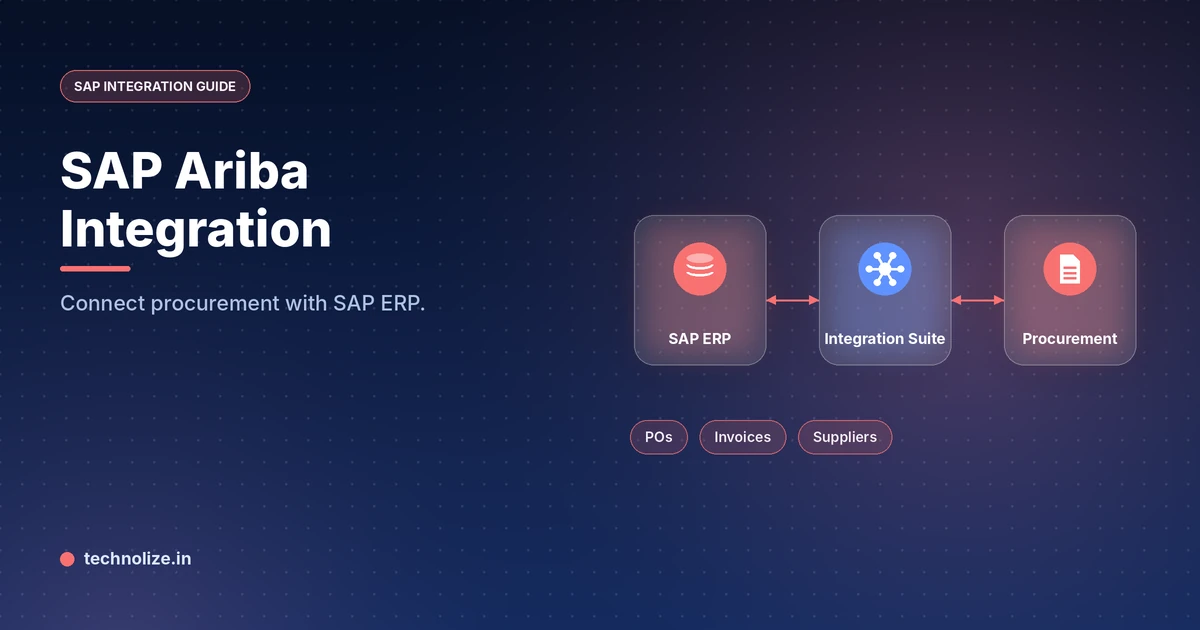
SAP Ariba integration connects procurement and supplier collaboration processes with SAP ERP or SAP S/4HANA, helping enterprises exchange business documents and coordinate purchasing activities across systems. Depending on the business requirements, this can include supplier data, purchase orders, goods receipts, invoices, sourcing information, and other procurement documents.
SAP provides integration options through SAP Integration Suite, managed gateway for spend management and SAP Business Network, as well as supported API-based scenarios for certain SAP S/4HANA environments. The right approach depends on the SAP Ariba solutions in use, the ERP edition, and the business processes being integrated. SAP Help Portal: Integration overview
What Is SAP Ariba Integration?
SAP Ariba integration is the process of connecting SAP Ariba procurement and sourcing solutions with SAP ERP, SAP S/4HANA, SAP Business Network, or other enterprise applications so that relevant business information can move between systems.
For example, a company may use SAP Ariba to manage buying activities and supplier collaboration while SAP S/4HANA manages purchasing execution, goods movements, accounting, and financial records.
Integration coordinates the information exchanged between these systems. Instead of asking employees to re-enter the same purchase order details or manually check transaction statuses, the organization can automate supported data flows.
Typical integration scenarios include:
- Transferring purchase orders between procurement and ERP systems.
- Sending goods receipt information to support procurement and invoice processes.
- Exchanging supplier information between SAP Ariba and SAP ERP or SAP S/4HANA.
- Connecting sourcing activities with purchasing execution.
- Exchanging invoice and order-status information where supported by the selected solution.
- Supporting supplier collaboration through SAP Business Network.
The exact scope depends on the SAP Ariba products, backend system, and integration method selected.
Why Do Enterprises Need SAP Ariba Integration?
Procurement is connected to several business functions. A purchase request can lead to sourcing, supplier selection, purchase order creation, goods receipt, invoice verification, and payment processing.
When these activities are spread across disconnected systems, delays and data inconsistencies can affect the entire process.
1. Reduce manual procurement work
Without appropriate integration, employees may need to enter or verify purchasing information in more than one application. Automated document exchange can reduce repetitive work and allow procurement teams to focus on supplier performance, sourcing decisions, and exceptions.
2. Improve purchase order visibility
Procurement teams need to understand whether purchase orders have been created, transmitted, acknowledged, changed, or fulfilled.
Integration helps relevant systems exchange purchase order information and status updates, subject to the configured scenario.
3. Improve supplier data consistency
Supplier information may be managed across supplier lifecycle applications and ERP systems. Defined data ownership and controlled replication help reduce conflicting supplier records.
SAP documents supported scenarios for creating suppliers in SAP Ariba and replicating approved supplier information to SAP S/4HANA, with selected information also flowing back to SAP Ariba. SAP Help: Supplier integration scenario
4. Support procurement and finance coordination
Purchase orders, goods receipts, and invoices need to be consistent enough for downstream verification and accounting processes. Integration can make relevant document information available across systems and help teams investigate mismatches earlier.
5. Connect procurement across business units
Enterprises operating multiple companies, purchasing organizations, or ERP environments may need a consistent way to coordinate procurement data. Integration architecture should account for organizational structures, business rules, and the systems responsible for each process.
Key SAP Ariba Integration Use Cases
The business value of integration depends on which procurement processes the organization wants to connect.
Purchase requisitions and purchase orders
Purchase requisitions represent internal demand for goods or services. After the required approvals and sourcing activities, a purchase order can be created or processed in the appropriate purchasing system.
Integration can support the exchange of relevant requisition and order information between SAP Ariba and the SAP backend, depending on the selected scenario.
A well-designed process should define where the requisition originates, which system creates or owns the purchase order, and how changes are communicated.
Goods receipts and order confirmations
When goods arrive, the organization needs to record receipt information and make it available to the relevant purchasing and finance processes.
Supported integrations can exchange goods receipt and related transaction information. The implementation must define how partial deliveries, quantity differences, cancellations, and document changes are handled.
Supplier lifecycle and master data
Supplier management can involve registration, qualification, approval, and replication into the ERP system.
A typical process may begin with a supplier request in SAP Ariba. Once the required approval and registration steps are completed, supplier information can be replicated to SAP S/4HANA. ERP-specific purchasing details may then be maintained in the backend and synchronized according to the integration design.
This process needs clear rules for supplier identifiers, duplicate detection, approval status, and ownership of financial or purchasing data.
Sourcing and contract management
Enterprises may connect SAP Ariba Sourcing or SAP Ariba Contracts with SAP S/4HANA to support sourcing requests, supplier selection, contract-related processes, and purchasing execution.
SAP documents specific sourcing and contract integration scenarios, including scenarios for central procurement. Availability depends on the relevant product and system scope. SAP Help: Integration with SAP Ariba applications
Invoice processing and payment visibility
Invoice integration can help connect supplier-submitted invoices with procurement and finance workflows. Relevant information may include invoice details, purchase order references, goods receipt references, validation results, and processing status.
The project must distinguish between invoice submission, invoice verification, accounting, and payment execution. These activities may occur in different systems, and integration does not automatically mean that every step is performed by SAP Ariba.
Supplier collaboration through SAP Business Network
SAP Business Network supports business document exchange and collaboration with trading partners. Integration with SAP ERP or SAP S/4HANA can help connect supplier-facing transactions with internal procurement execution.
The relevant document types, supported flows, and configuration depend on the selected integration scenario and business requirements.
How Does SAP Ariba Integration Work?
A typical integration landscape includes the procurement application, an integration layer or supported connection method, and the SAP ERP or SAP S/4HANA backend.
A simplified flow looks like this:
- A business event occurs, such as a purchase order being created or a supplier being approved.
- The source application prepares the relevant business information.
- The configured integration mechanism transfers and, where necessary, maps the data.
- The receiving application validates and processes the document.
- The result, status, or error is made available according to the configured process.
- Monitoring and exception-handling procedures help the support team resolve failed transactions.
This is a conceptual flow, not a universal technical sequence. The actual architecture depends on the products and integration scenario.
The role of SAP Integration Suite, managed gateway
SAP Integration Suite, managed gateway for spend management and SAP Business Network is designed to connect supported SAP procurement solutions, SAP Business Network, and backend systems.
SAP documents both add-on-based integration and API-based integration for supported scenarios. In an add-on-based setup, the relevant add-on is installed on SAP ERP or SAP S/4HANA. API-based integration uses supported SAP S/4HANA APIs for eligible scenarios. SAP Help: Integration methods
The managed gateway supports functions such as data mapping, transformation, and transaction monitoring. The exact capabilities and prerequisites should be checked against the target products and versions.
Can SAP Integration Suite Cloud Integration also be used?
SAP Integration Suite includes Cloud Integration, which supports integration across SAP and non-SAP applications. However, Cloud Integration and the managed gateway for spend management and SAP Business Network are not interchangeable names for the same product or connection method.
The architecture should identify whether a documented managed-gateway scenario, a supported API-based approach, or a broader middleware design best fits the requirement. Adding another middleware layer should solve a specific architectural need rather than introduce unnecessary complexity.
Choosing the Right Integration Approach
There is no single integration method that fits every SAP Ariba implementation.
| Approach | When to evaluate it |
| Managed gateway with an ERP add-on | When the required scenario supports the relevant SAP ERP or SAP S/4HANA add-on |
| API-based integration | When the required business process and SAP S/4HANA edition support the necessary APIs |
| Middleware-based architecture | When the landscape requires additional routing, transformation, orchestration, or integration with other applications |
| Hybrid approach | When different business processes have different supported integration requirements |
These options should be validated against current SAP documentation, product versions, licensing, prerequisites, and the exact process scope.
For example, SAP documents API-based connections for selected SAP S/4HANA scenarios, but the supported scope is not necessarily identical to the add-on-based approach. This is especially important when service procurement or specialized business processes are involved.
Important Design Decisions Before Implementation
Selecting an integration technology is only one part of the project. Enterprises should also define the business and technical rules that govern the exchange of information.
1. Define the system of record
Decide which application owns each type of information.
For example, SAP Ariba may manage supplier registration, while SAP S/4HANA maintains purchasing organization assignments or other ERP-specific supplier attributes. The final ownership model must reflect the actual business process.
Avoid allowing multiple systems to update the same fields without clear rules.
2. Map business documents and data fields
Identify the fields required for each integration flow. These may include supplier IDs, company codes, purchasing organizations, currencies, quantities, tax details, product identifiers, and document references.
Mapping should account for different field formats, mandatory values, organizational structures, and validation rules.
3. Define transaction timing
Not every process requires immediate processing. Some documents may need prompt exchange, while other master data or reporting processes can use scheduled transfers.
Choose the timing based on business impact, transaction volume, system capabilities, and supported integration behavior.
4. Plan for errors and reprocessing
Integration failures can result from invalid master data, missing references, authorization problems, connectivity issues, or incompatible document values.
The implementation should define how errors are detected, who receives alerts, how failed transactions are corrected, and when documents can safely be reprocessed. Duplicate prevention is particularly important for purchasing and financial documents.
5. Establish security and access controls
Procurement integrations may transfer supplier information, commercial terms, purchase details, and invoice data.
Use appropriate authentication, authorization, encrypted communication, credential management, and audit controls. Access should follow least-privilege principles, and sensitive data should be handled according to the organization’s policies.
6. Set up monitoring and ownership
Business and technical teams need visibility into failed, delayed, or rejected transactions.
Define operational responsibilities, escalation paths, monitoring expectations, and service levels before production deployment. Monitoring should help teams identify the affected business document, the failing integration layer, and the next corrective action.
SAP Ariba Integration Implementation Roadmap
A structured implementation reduces the risk of deploying an integration that works technically but fails to support the business process.
Phase 1: Assess current processes
Document the procurement workflows, SAP Ariba products, ERP edition, existing interfaces, supplier landscape, transaction volumes, and known process gaps.
Identify which manual activities cause the greatest delays or data inconsistencies.
Deliverable: Current-state assessment and prioritized integration scope.
Phase 2: Design the target architecture
Select the appropriate supported integration approach for each process. Define system ownership, data mapping, document flows, security requirements, error handling, and monitoring.
Deliverable: Integration architecture and interface specifications.
Phase 3: Configure and develop
Set up the required connections, supported add-ons or APIs, mappings, business rules, and integration configurations. Reuse standard SAP-supported content where appropriate rather than rebuilding standard functionality without a clear reason.
Deliverable: Configured integration flows and documented technical settings.
Phase 4: Test end-to-end business scenarios
Testing should cover more than successful document transmission. Include:
- Purchase order creation and changes.
- Supplier creation and updates.
- Goods receipt and invoice-related flows within scope.
- Invalid data and missing master data.
- Rejected or duplicated transactions.
- Authorization and connectivity failures.
- Reprocessing and recovery.
- Expected transaction volumes and response times.
Deliverable: Test results, resolved defects, and business sign-off.
Phase 5: Deploy and stabilize
Deploy using an agreed cutover plan. Confirm monitoring, support ownership, escalation procedures, and rollback or recovery options before switching over business-critical processes.
Track failures and processing delays during the initial production period, then refine the configuration based on operational findings.
Deliverable: Production-ready integration and a support handover.
Common SAP Ariba Integration Challenges
Inconsistent supplier master data
Different supplier identifiers, incomplete records, or duplicate suppliers can prevent successful document processing. Establish master-data ownership and validation rules before enabling automated replication.
Incorrect document mapping
Differences in units of measure, currency, tax information, organizational assignments, or mandatory fields can lead to rejected transactions. Validate mappings against real business examples and edge cases.
Choosing an unsupported integration path
A method that works for one SAP S/4HANA edition or procurement scenario may not support another. Confirm the relevant SAP documentation, prerequisites, and process scope before committing to an architecture.
Treating technical connectivity as project completion
A successful connection does not prove that procurement works end to end. Validate business approvals, document status, accounting implications, exceptions, and operational ownership.
Insufficient monitoring
If teams cannot identify which layer failed, troubleshooting becomes slower. Make transaction-level monitoring and clear escalation responsibilities part of the initial design.
Business Benefits of SAP Ariba Integration
When implemented around well-defined business requirements, SAP Ariba integration can help enterprises:
- Reduce repetitive data entry across procurement applications.
- Improve consistency of supplier and purchasing information.
- Increase visibility into purchase order and supplier transactions.
- Support more coordinated procurement and accounts payable processes.
- Reduce manual investigation of document mismatches.
- Improve control over integration failures and exceptions.
- Build a more connected procurement landscape across SAP applications.
The actual benefits depend on process design, data quality, adoption, and the reliability of the integration. Enterprises should establish baseline measures before implementation rather than assume that integration alone will eliminate every manual task.
How to Choose an SAP Ariba Integration Partner
An integration partner should understand both SAP technology and procurement operations.
Evaluate prospective partners against these areas:
- SAP product knowledge: Experience with the specific SAP Ariba solutions and SAP ERP or SAP S/4HANA edition in scope.
- Integration architecture: Ability to explain the available managed-gateway, API-based, and middleware options.
- Procurement process understanding: Knowledge of supplier onboarding, purchasing, sourcing, goods receipts, and invoice-related workflows.
- Data mapping: Experience handling master data, document references, organizational structures, and validation rules.
- Testing methodology: Coverage of normal transactions, exceptions, recovery, and business acceptance.
- Security and governance: Clear controls for credentials, access, auditability, and sensitive business information.
- Monitoring and support: Defined procedures for transaction failures, reprocessing, escalation, and ongoing maintenance.
- Documentation and knowledge transfer: Architecture diagrams, interface specifications, operating procedures, and training for internal teams.
Ask the partner to explain a relevant integration scenario, including how it handles failed transactions and how the team identifies the source of an error. A clear, technically grounded explanation is more useful than a generic promise of seamless integration.
SAP Ariba Integration Checklist
Before moving into production, confirm that the project team has addressed the following:
- SAP Ariba products and backend systems are identified.
- The supported integration method is confirmed for the selected scenario.
- System-of-record responsibilities are documented.
- Required business documents and data fields are mapped.
- Security, authentication, and authorization are configured.
- End-to-end business testing is completed.
- Failed transactions can be monitored and investigated.
- Duplicate prevention and reprocessing rules are defined.
- Business users have validated the complete workflow.
- Production support and escalation responsibilities are agreed.
- Technical documentation and knowledge transfer are complete.
Frequently Asked Questions
What is SAP Ariba integration?
SAP Ariba integration connects SAP Ariba procurement, sourcing, or supplier collaboration solutions with SAP ERP, SAP S/4HANA, SAP Business Network, or other applications to exchange relevant business data and documents.
How does SAP Ariba integrate with SAP S/4HANA?
Depending on the supported scenario, enterprises can use SAP Integration Suite, managed gateway for spend management and SAP Business Network with an appropriate add-on, or API-based integration for eligible SAP S/4HANA processes. The required method depends on the product edition and business scope.
Can SAP Ariba integrate with SAP ERP?
Yes. SAP documents integration options for supported SAP ERP environments. The appropriate add-on, prerequisites, and business process scope must be confirmed for the specific ERP version and SAP Ariba solution.
What data can be exchanged between SAP Ariba and SAP ERP?
Depending on the selected integration scenario, this may include supplier data, purchase orders, goods receipts, invoices, sourcing information, and related business documents. Not every integration supports every document type or direction of data flow.
Is SAP Integration Suite required for SAP Ariba integration?
The answer depends on the products and integration scenario. SAP documents managed-gateway and API-based options for supported processes, while other enterprise requirements may call for additional middleware. Confirm the applicable SAP-supported architecture before implementation.
How long does SAP Ariba integration take?
There is no universal timeline. Duration depends on the number of business processes, the ERP landscape, data quality, custom requirements, security approvals, testing scope, and deployment complexity. A scoped assessment is the best starting point for a realistic estimate.
What are the main challenges in SAP Ariba integration?
Common challenges include inconsistent supplier data, document-mapping errors, unsupported integration assumptions, connectivity and authorization issues, insufficient testing, and weak transaction monitoring.
Final Thoughts
SAP Ariba integration is not just about connecting procurement software to an ERP system. It is about coordinating supplier information, purchasing documents, and business processes so that procurement and finance teams can work with consistent information.
Enterprises should begin by identifying their most important procurement workflows, confirming the supported integration options, and defining data ownership and exception handling. With a clear architecture, end-to-end testing, and reliable monitoring, SAP Ariba integration can provide a stronger foundation for connected enterprise procurement.
For organizations planning SAP integration or procurement modernization, Technolize can help assess integration requirements, define an appropriate architecture, and plan implementation around business priorities.