Customers expect a consistent experience when they interact with a business. They may discover a product online, speak with a sales representative, contact customer support, and later check an order or request a service. Each interaction should reflect accurate information about the customer and their relationship with the company.
However, enterprises often manage these activities across separate CRM, e-commerce, marketing, service, and ERP systems. When the systems do not exchange information effectively, employees may lack customer context, sales teams may work with outdated records, and service teams may struggle to find relevant order information.
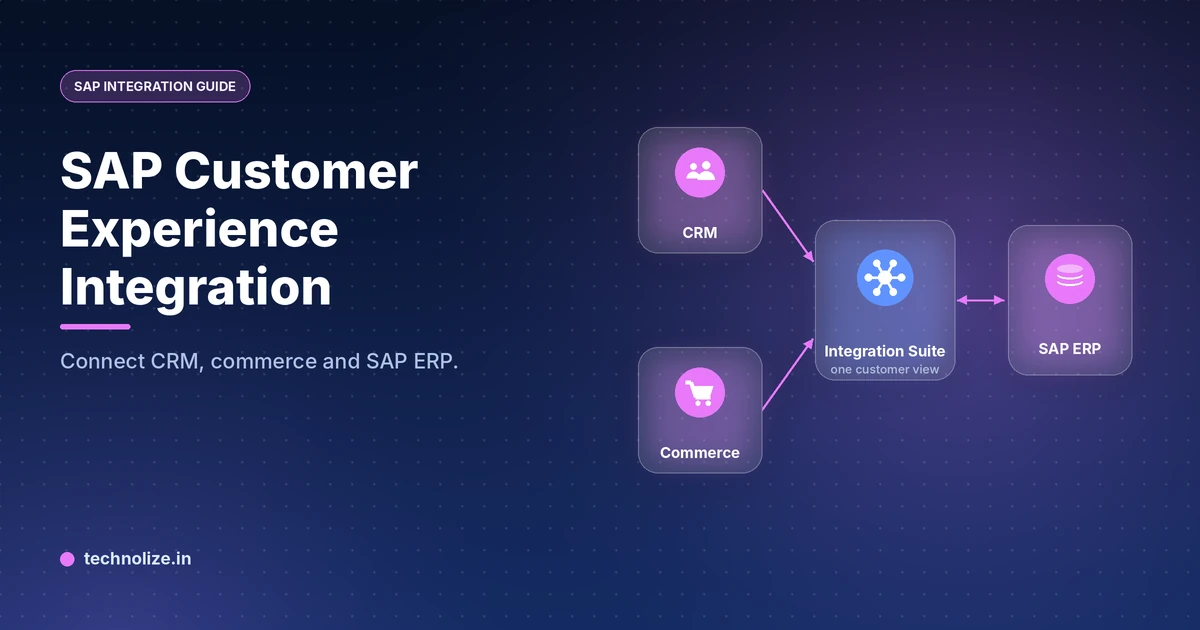
SAP Customer Experience integration connects customer-facing applications with SAP ERP, SAP S/4HANA, and other enterprise systems so that sales, commerce, service, and customer data can work together across business processes.
SAP’s customer experience integration landscape includes solutions such as SAP Commerce Cloud, SAP Sales and Service Cloud, SAP Customer Data Cloud, and other customer-facing applications. SAP Integration Suite can help connect these applications with enterprise operations, including ERP, supply chain, and finance. The appropriate architecture depends on the products deployed and the business processes being integrated. SAP: Customer Experience platform
This guide explains the main integration use cases, architecture decisions, implementation steps, and challenges enterprise IT, sales, and customer experience leaders should consider.
What Is SAP Customer Experience Integration?
SAP Customer Experience integration is the process of connecting customer-facing applications with one another and with the enterprise systems that manage business operations.
These integrations can connect customer relationship management, digital commerce, service management, customer identity, and customer data processes with SAP ERP or SAP S/4HANA.
For example, a company may use a commerce platform to manage online purchases, a sales application to manage customer opportunities, and SAP S/4HANA to process orders and financial transactions.
Integration enables the systems to exchange the information required for each stage of the customer journey.
Typical scenarios include:
- Synchronizing customer and business partner information.
- Connecting sales activities with ERP customer and order data.
- Connecting e-commerce product, pricing, and order information with backend systems.
- Making relevant order and service information available to customer-facing teams.
- Coordinating customer identity, profile, and consent information.
- Connecting marketing and customer engagement applications with customer data platforms.
- Supporting lead-to-cash processes across customer-facing and operational systems.
Not every enterprise uses all these SAP products. The integration scope should reflect the organization’s actual application landscape rather than assume that every capability belongs to one product.
Why Do Enterprises Need SAP CX Integration?
Customer experience depends on more than the front-end application. It also depends on the accuracy and availability of the information behind it.
1. Create a more consistent customer view
Customer information may exist in CRM, commerce, service, and ERP systems. Without clear synchronization rules, teams can encounter duplicate records, outdated contact details, or conflicting account information.
Integration helps synchronize the relevant data and establishes how updates are shared across systems.
2. Connect sales with business operations
Sales representatives need more than contact details. They may also need order history, product availability, pricing information, and relevant account information.
Connecting sales applications with backend systems can help employees access the business context required to support customer conversations and manage opportunities.
3. Improve the online buying experience
Commerce customers expect accurate product details, pricing, stock availability, and order status.
Integration connects the storefront with the systems responsible for these business functions, subject to the configured architecture and supported interfaces.
4. Give service teams better customer context
When customers contact support about an order, product, or service issue, agents need access to relevant information.
Integration can connect customer-facing service applications with order, product, and customer records, reducing the need for employees to search through disconnected systems.
5. Improve coordination across the customer journey
The customer journey may span marketing, sales, commerce, service, and finance. Integration allows relevant information to move between these functions while preserving the responsibility of each system.
The result is a more coordinated business process rather than a collection of isolated applications.
Key SAP Customer Experience Integration Use Cases
The right integration design depends on the customer journey and the systems responsible for each business activity.
CRM and SAP ERP integration
CRM applications manage customer-facing sales activities, while ERP systems manage operational and financial processes.
Integration can connect customer and business partner records, account information, sales documents, and relevant order data. Depending on the products involved, it may also support the exchange of sales orders, invoices, or other business information.
For example, a sales representative may need to check whether a customer’s order has been processed. The CRM application can display relevant information supplied by the backend integration, provided the required scenario is configured.
The implementation should define customer record ownership, account identifiers, and which system creates or updates each type of business document.
SAP Commerce Cloud integration
SAP Commerce Cloud supports digital commerce experiences. Its integration capabilities connect the commerce platform with SAP backend systems and selected customer experience applications.
Common use cases include:
- Product and catalog synchronization.
- Customer and business partner replication.
- Pricing and availability integration.
- Order creation and order-status exchange.
- Service and after-sales integration.
SAP documents integration extensions for connecting SAP Commerce Cloud with SAP CRM, SAP ERP, SAP S/4HANA, SAP Customer Data Cloud, and other supported applications. Available functions vary by integration module. SAP Help: SAP Commerce Cloud Integration Extension Pack
Sales and service integration
Sales and service teams often need related information about customers, products, and existing business relationships.
Connecting sales and service applications with relevant ERP or CRM data can help agents understand a customer’s account and the context of a request.
Depending on the selected SAP products and supported interfaces, integration may include customer records, service requests, service orders, products, and related business information.
The architecture should define which application owns the service case, which system executes the underlying business transaction, and how status changes are communicated.
Customer identity and profile integration
Customer identity management is related to CRM, but it serves a different purpose.
SAP Customer Data Cloud provides capabilities for registration, login, profile management, and consent management. SAP documents integration with SAP Commerce Cloud for these scenarios. SAP Help: SAP Customer Data Cloud integration
For example, a customer may update profile information or manage consent preferences through a digital storefront. The integration design should determine how relevant changes are shared and which system is responsible for each data object.
Authentication, profile management, marketing consent, and ERP business partner records should not be treated as identical functions.
Marketing and customer data integration
Marketing applications may need customer attributes, engagement activity, segmentation information, and communication preferences.
Integration can help coordinate customer data and engagement systems so that relevant marketing activities reflect the available customer information and consent settings.
The implementation should define the source of customer attributes, how consent changes are propagated, and which data can be used for specific communication purposes.
The exact integration pattern depends on the SAP marketing and customer data products deployed.
Order and service visibility
Customers may contact sales or service teams about order confirmation, delivery, returns, or service requests.
Integrating customer-facing applications with the appropriate operational systems can make relevant status information available without requiring staff to check every backend separately.
The integration should clearly distinguish between displaying a status, initiating a transaction, and executing the underlying business process.
How Does SAP Customer Experience Integration Work?
A typical architecture connects customer-facing applications, an integration layer, and enterprise backend systems.
A simplified process might work as follows:
- Customer or account information is created or updated in its designated source system.
- Relevant information is transferred to connected applications using the configured integration mechanism.
- A customer interacts with the sales, commerce, or service application.
- The application retrieves or receives the information required for the relevant business process.
- A transaction, such as an order or service request, is created or updated.
- The responsible backend system processes the transaction.
- Relevant status information is made available to the customer-facing application where supported.
This is a conceptual overview. Some information may be replicated in advance, while other information is retrieved through APIs or exchanged through event-based or message-based integration.
The Role of SAP Integration Suite
SAP Integration Suite is an integration platform that supports connectivity across SAP and third-party applications, including cloud, on-premises, and hybrid environments. It provides capabilities for application integration, API management, event-driven integration, and business-to-business connectivity. SAP Integration Suite
In a customer experience landscape, it can help connect applications with enterprise systems while managing the data flows between them.
Depending on the architecture, integration capabilities may support:
- Mapping and transforming customer or business data.
- Routing information between applications.
- Connecting cloud services with backend systems.
- Coordinating multi-step integration processes.
- Managing API access and policies.
- Monitoring messages and investigating failures.
- Supporting reusable integration patterns across business units.
The value of the integration platform depends on the design of the individual business processes. An integration layer cannot resolve unclear data ownership or inconsistent business rules by itself.
Standard integration content versus custom development
Before building a custom interface, enterprises should check whether SAP provides standard integration content or a documented integration scenario for the products involved.
Standard content may reduce development effort where it matches the requirement. Custom integration may still be necessary for unique data models, specialized workflows, or third-party applications.
The decision should consider functional coverage, supported product versions, maintainability, monitoring, and future changes.
Choosing the Right Integration Architecture
Different customer experience processes may require different integration patterns.
| Integration requirement | Approach to evaluate |
| Customer and business partner synchronization | Supported master data integration or API-based exchange |
| Product and catalog synchronization | Standard commerce integration content where available |
| Order creation and status updates | Supported order management integration or APIs |
| Customer profile and consent management | Customer identity and consent integration |
| Real-time access to selected business information | Supported API or service-based integration |
| Coordination across multiple SAP and non-SAP applications | SAP Integration Suite or another supported integration architecture |
| Business events and asynchronous processing | Event-driven or message-based integration where supported |
The final design should be based on the exact SAP products, deployment models, supported interfaces, data volumes, and business requirements.
A single integration method should not be forced onto every process when the underlying applications have different technical and operational needs.
Important Design Decisions Before Implementation
1. Establish a clear customer data model
Define what the organization means by a customer across its systems.
A consumer profile, a business partner, a company account, a contact person, and a marketing identity can represent different data objects.
The integration design should map these objects appropriately and establish which system owns each field.
2. Define system-of-record responsibilities
For each data object, determine where it is created, where it is maintained, and where updates must be sent.
For example, ERP may own financial account information, a commerce platform may manage storefront-specific content, and a customer identity service may manage authentication and consent preferences.
Clear ownership reduces conflicting updates and makes errors easier to investigate.
3. Decide which data should be replicated
Not every application needs a full copy of every customer record.
Define which fields are required by each connected application, how frequently they need to be updated, and whether information should be replicated or retrieved when needed.
This decision affects performance, data freshness, privacy, and system complexity.
4. Plan identity matching and duplicate handling
A customer may exist in multiple systems under different identifiers.
Define matching rules, duplicate detection, identifier mapping, and procedures for merging or correcting records. Avoid relying only on names or email addresses when the business requires stronger identification rules.
5. Protect customer privacy and consent
Customer experience systems may handle personal data, identity information, purchase history, and marketing preferences.
Define which applications may access each data category, how consent changes are propagated, and how deletion or correction requests are handled. Apply appropriate authentication, authorization, encryption, and audit controls.
6. Design for failures and recovery
Integration failures can cause missing customer updates, incomplete orders, or delayed service information.
Define how the team will detect failures, correct source data, reprocess messages safely, and prevent duplicate business transactions.
Monitoring should identify the affected record or transaction and the responsible integration flow.
7. Plan for performance and scale
Customer-facing applications may experience sudden increases in traffic during promotions, seasonal campaigns, or product launches.
Test API response times, synchronization throughput, backend capacity, and message processing under realistic workloads. Keep customer-facing response times in mind when deciding which processes should be synchronous.
SAP Customer Experience Integration Implementation Roadmap
Phase 1: Assess the current landscape
Document the existing CRM, commerce, service, marketing, identity, and ERP applications.
Identify where customer records are created, how data is shared, which integrations already exist, and where manual work or inconsistent records cause problems.
Deliverable: Current-state assessment and prioritized integration scope.
Phase 2: Design the target architecture
Define the customer data model, system ownership, integration patterns, security requirements, API needs, and monitoring approach.
Identify reusable standard integration content and document any gaps requiring custom development.
Deliverable: Target architecture and integration specifications.
Phase 3: Configure and develop
Set up the required connections, integration flows, APIs, data mappings, authentication, and business rules.
Where standard SAP-supported capabilities meet the requirements, evaluate them before developing custom interfaces.
Deliverable: Configured integrations and documented technical settings.
Phase 4: Test end-to-end customer journeys
Testing should validate business outcomes, not just message transmission.
Include:
- Customer and business partner creation.
- Customer profile updates.
- Duplicate and conflicting record handling.
- Product and order information exchange.
- Sales and service workflows.
- Consent updates where applicable.
- API authorization and data access.
- Failed messages and safe reprocessing.
- Performance under expected usage.
Deliverable: Test evidence, defect resolution, and business acceptance.
Phase 5: Deploy and stabilize
Deploy according to an agreed rollout plan. Confirm monitoring, operational ownership, escalation procedures, and recovery steps before production use.
Review integration failures and business feedback during the initial production period.
Deliverable: Production deployment and operational handover.
Common SAP CX Integration Challenges
Inconsistent customer records
Different identifiers, duplicate accounts, and conflicting field values can make it difficult to maintain a consistent customer view.
Address these issues through a defined data model, ownership rules, and validation procedures.
Confusion between identity and business partner data
Customer login credentials and consent preferences are not the same as ERP customer or business partner records.
Treat identity, profile, consent, and transactional data as distinct objects with clearly defined integration responsibilities.
Too many point-to-point connections
When each application connects directly to several others, changes become harder to maintain and troubleshoot.
Evaluate reusable integration patterns and centralized governance where they provide a clear benefit.
Poorly defined real-time requirements
Not all customer information needs to be updated synchronously. Excessive real-time calls can increase system dependency and response times.
Choose the appropriate integration timing for each process and document how the customer experience should behave during delays.
Weak monitoring and support
If failures are not visible to the responsible teams, customer-facing issues may remain unresolved.
Establish transaction-level monitoring, alerts, escalation paths, and safe recovery procedures.
Customizing before assessing standard capabilities
Custom interfaces may increase long-term maintenance when a supported integration already meets the requirement.
Review standard SAP integration content and supported APIs before committing to custom development.
Business Benefits of SAP Customer Experience Integration
A well-designed integration can help enterprises:
- Improve consistency of customer and account information.
- Connect sales activities with operational business data.
- Provide more accurate product, pricing, and order information.
- Give service teams better visibility into customer transactions.
- Coordinate customer profiles and consent preferences.
- Reduce manual data entry and record reconciliation.
- Improve visibility into integration failures and transaction status.
- Support more consistent customer experiences across channels.
The actual benefits depend on the existing landscape, data quality, and process design. Organizations should establish baseline measures for duplicate records, manual corrections, order visibility, and integration failures before deployment.
How to Choose an SAP Customer Experience Integration Partner
An integration partner should understand customer experience processes as well as enterprise data and architecture.
Evaluate prospective partners on the following criteria:
- SAP product experience: Familiarity with the SAP CX products and ERP editions used by the organization.
- Integration architecture: Ability to select suitable integration methods for each process.
- Customer data management: Experience with business partners, customer profiles, identity, and consent.
- Commerce and order management: Understanding of product data, pricing, orders, and fulfillment.
- Sales and service processes: Knowledge of how customer-facing workflows connect with backend operations.
- Security and governance: Clear controls for access, personal data, and consent.
- Testing and monitoring: Ability to validate complete business flows and investigate failures.
- Documentation and handover: Clear architecture diagrams, interface specifications, operating procedures, and knowledge transfer.
Ask a potential partner to explain how it would handle a customer record updated in CRM but not reflected in the commerce platform. A useful answer should cover data ownership, replication, mapping, monitoring, and safe recovery.
SAP Customer Experience Integration Checklist
Before production deployment, confirm that:
- All customer-facing and backend applications are identified.
- The customer data model and identifiers are documented.
- System-of-record responsibilities are clear.
- Standard integration capabilities have been evaluated.
- Replicated and real-time data requirements are defined.
- Identity and consent responsibilities are separated from ERP master data.
- Authentication and access controls are configured.
- End-to-end customer journeys are tested.
- Duplicate handling and recovery procedures are defined.
- Monitoring and operational ownership are agreed.
- Documentation and knowledge transfer are complete.
Frequently Asked Questions
What is SAP Customer Experience integration?
SAP Customer Experience integration connects customer-facing applications, such as CRM, commerce, service, and customer data solutions, with one another and with enterprise systems such as SAP ERP or SAP S/4HANA.
Which SAP products can be part of a CX integration landscape?
Depending on the organization’s requirements, the landscape may include SAP Commerce Cloud, SAP Sales and Service Cloud, SAP Customer Data Cloud, SAP ERP, SAP S/4HANA, and SAP Integration Suite. The selected products and integration scope vary by business.
How does SAP Integration Suite support SAP CX integration?
SAP Integration Suite provides integration capabilities for connecting applications, APIs, events, and business processes across SAP and non-SAP environments. It can support data exchange, transformation, routing, connectivity, and monitoring.
Is SAP CX integration the same as SAP CRM integration?
No. SAP CRM integration is one part of the broader customer experience landscape. SAP CX integration can include CRM, commerce, customer identity, service, customer data, and other customer-facing processes.
Can SAP CX integration provide a unified customer view?
It can help connect customer information across applications, but a unified view also requires a clear data model, identity matching, system ownership, and data governance. Integration alone does not automatically eliminate duplicate or inconsistent records.
How long does SAP Customer Experience integration take?
There is no universal timeline. Duration depends on the number of applications, data complexity, supported interfaces, customer identity requirements, custom workflows, security reviews, and testing scope. A scoped assessment is needed for a realistic estimate.
What are the main challenges in SAP CX integration?
Common challenges include inconsistent customer records, unclear data ownership, identity and consent mismatches, excessive point-to-point connections, performance issues, and insufficient monitoring.
Final Thoughts
SAP Customer Experience integration connects customer-facing applications with the operational systems that support sales, commerce, service, and finance.
The most effective approach begins with the customer journey and the information each business function needs. By defining data ownership, selecting supported integration methods, protecting customer information, and validating complete workflows, enterprises can build a more consistent and maintainable customer experience landscape.
For organizations modernizing their SAP integration landscape, Technolize can help assess integration requirements, define the target architecture, and plan implementation around business and technical priorities.