Enterprises often depend on external workers, contractors, staffing agencies, and service providers to complete important business activities. Managing these relationships requires coordination between workforce management, procurement, finance, and enterprise resource planning systems.
When these systems operate separately, teams may need to update supplier information manually, reconcile purchase orders, verify service records, or investigate differences between workforce and financial data.
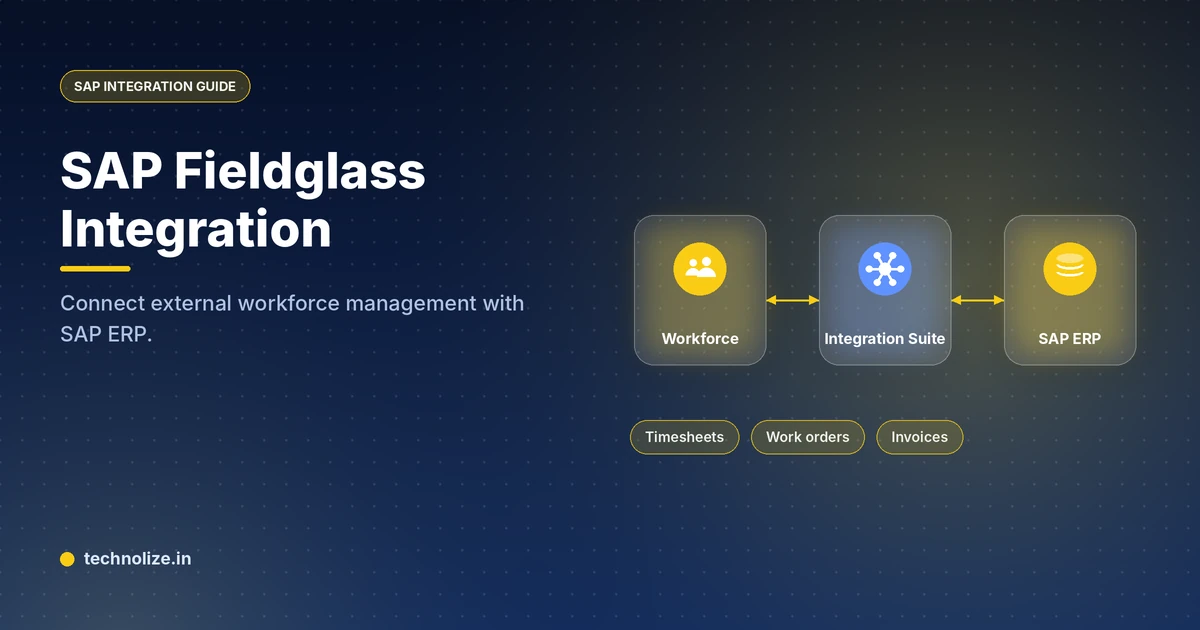
SAP Fieldglass integration connects external workforce management and services procurement processes with SAP ERP or SAP S/4HANA, helping enterprises exchange relevant master data and transactional information across systems.
SAP Fieldglass supports the management of contingent workers and external services. SAP’s documented integration scenarios with SAP S/4HANA include business partner integration, master data integration, and transactional data integration. The appropriate setup depends on the business process, product edition, and integration architecture. SAP Help Portal: SAP Fieldglass and SAP S/4HANA integration
This guide explains the main integration use cases, architecture options, implementation steps, and challenges enterprise IT and procurement leaders should consider.
What Is SAP Fieldglass Integration?
SAP Fieldglass integration is the process of connecting SAP Fieldglass with SAP ERP, SAP S/4HANA, HR applications, procurement platforms, or other enterprise systems to exchange business information.
For example, an organization may use SAP Fieldglass to manage external workers and service engagements while SAP S/4HANA maintains supplier master data, purchasing documents, and financial transactions.
Integration helps these systems exchange the information needed to support their respective business responsibilities.
Typical integration scenarios include:
- Replicating supplier or business partner information from SAP S/4HANA to SAP Fieldglass.
- Synchronizing master data such as cost centers and other organizational information.
- Exchanging purchase order and service-related transactional data.
- Supporting time sheet, invoice, or work-order processes where the selected solution supports them.
- Connecting external workforce management with procurement and finance workflows.
- Coordinating information across SAP Fieldglass, SAP Ariba, and SAP ERP where required.
Not every implementation includes all these scenarios. The project team should define the required data flows based on the organization’s workforce model and procurement processes.
Why Do Enterprises Need SAP Fieldglass Integration?
External workforce management involves more than maintaining worker records. It can affect supplier management, service procurement, budgeting, purchasing, and payment processing.
Without appropriate integration, a change in one system may not be reflected promptly in another.
1. Reduce manual data entry
Procurement and HR operations teams may need to maintain business units, cost centers, supplier details, or other records across multiple applications.
Automated data exchange can reduce repetitive work and the risk of inconsistent information.
2. Improve supplier and vendor data consistency
Supplier information must be accurate for purchasing and financial processes to work correctly. Integration can help synchronize relevant supplier records and business partner relationships between SAP systems.
The implementation should define how new suppliers, updates, inactive records, and duplicate records are handled.
3. Connect workforce activity with procurement
External worker engagements and service assignments may involve purchase orders, statements of work, service milestones, or other procurement documents.
Integration helps connect the relevant records so procurement teams can follow the process across systems without relying entirely on manual updates.
4. Improve financial process coordination
External services can create downstream requirements for invoice verification, accounting, and payment. When the required transaction data is exchanged correctly, finance teams can work with more consistent information.
However, integration does not automatically mean that every time sheet, invoice, approval, or payment is processed by SAP Fieldglass. Responsibilities depend on the configured business process.
5. Support enterprise-wide visibility
Organizations operating across business units or regions may need consistent workforce and supplier information across multiple systems.
A defined integration architecture helps establish which data is shared, which application owns it, and how exceptions are managed.
Key SAP Fieldglass Integration Use Cases
The right integration scope depends on how the organization uses SAP Fieldglass and which SAP backend applications support the relevant processes.
Business partner and supplier integration
Business partner integration can replicate vendor information from SAP S/4HANA to SAP Fieldglass.
For example, when a supplier is created or updated in the ERP system, the required information can be transferred to Fieldglass using a supported integration method.
The design should identify which system owns the supplier record, how vendor identifiers are mapped, and how contact or business partner relationship information is handled.
Master data integration
SAP Fieldglass needs accurate foundational information to support workforce and services processes.
Depending on the implementation, master data may include:
- Business units and organizational structures.
- Cost centers.
- Sites and locations.
- Other purchasing or financial reference data.
- Additional master data required by the selected integration scenario.
SAP documents master data integration between SAP S/4HANA and SAP Fieldglass as a distinct integration scenario. The exact objects and direction of transfer should be confirmed for the chosen solution. SAP Help Portal: Integration workflows
Transactional data integration
Master data establishes the information that business processes use. Transactional data represents the actual business activities.
Depending on the supported scope, this may involve purchase orders, service-related transactions, work-order information, or other procurement records.
The integration must define how a transaction is created, updated, validated, and reflected in the receiving application. It should also account for rejected documents, cancellations, and corrections.
Services procurement integration
Enterprises purchasing external services need coordination between service requirements, supplier engagement, purchasing documents, and financial processes.
SAP documents integration scenarios involving SAP Fieldglass and SAP S/4HANA for services-related business processes. The specific scope depends on the solution and implementation model.
For example, an organization may need to connect a service engagement with a purchasing document and ensure that the required reference information is available to downstream processes.
Time sheets and invoice-related processes
Some external workforce processes involve recording working time, approving submitted time, checking contracted services, and processing related invoices.
Where the selected Fieldglass and ERP configuration supports these flows, integration can help exchange the necessary transaction information.
Before implementation, confirm which application handles time entry, approval, invoice verification, and payment. These responsibilities should not be assumed to be identical across all organizations.
How Does SAP Fieldglass Integration Work?
A typical architecture connects SAP Fieldglass with SAP S/4HANA or SAP ERP through a supported integration method.
The high-level process usually includes these steps:
- A business event or scheduled process identifies the information that needs to be transferred.
- The source system prepares the required master or transactional data.
- The integration mechanism transfers the information and performs any required mapping or transformation.
- The receiving application validates and processes the data.
- The result or error is made available to the relevant operational teams.
- Monitoring and support procedures help resolve failed or delayed transactions.
The actual sequence depends on whether the integration is direct, mediated through middleware, or based on another supported connection model.
Direct connectivity
SAP documents direct connectivity for certain SAP S/4HANA and SAP Fieldglass business partner integration scenarios.
In the documented approach, SAP S/4HANA uses supported web service specifications and its SOA Manager configuration to send business partner information to Fieldglass.
This method should be considered only after confirming that the relevant system versions, business process, and technical prerequisites support it.
Mediated connectivity with SAP BTP
Mediated connectivity places an integration layer between the source and target applications.
SAP’s integration documentation describes mediated approaches using SAP Connectivity service or SAP NetWeaver PI middleware for relevant SAP S/4HANA and Fieldglass scenarios. The documentation identifies mediated connectivity as the preferred approach for newer SAP S/4HANA Cloud and SAP S/4HANA tenants within that integration context.
Depending on the architecture, middleware can help with:
- Mapping data fields between applications.
- Transforming message formats.
- Applying business-specific rules.
- Controlling connectivity and access.
- Handling integration errors.
- Monitoring transactions.
For new projects, assess the current SAP-supported options and lifecycle requirements rather than automatically selecting a legacy middleware approach.
SAP Integration Suite and integration flows
SAP Integration Suite provides integration capabilities for connecting SAP and non-SAP applications across cloud, on-premises, and hybrid landscapes. Its Cloud Integration capability supports integration flows that can transform and route data between connected systems. SAP Integration Suite
Where a supported Fieldglass integration package or flow is available for the required scenario, the team should evaluate whether it meets the business requirements before developing a custom solution.
Important: SAP Fieldglass integration does not always require the same middleware, package, or connectivity pattern. The architecture should be selected for the specific integration scenario and target environment.
SAP Fieldglass Integration Architecture: What Should Enterprises Consider?
A reliable architecture starts with the business data that needs to move, not simply with the choice of middleware.
Define the system of record
Identify which application owns each data object.
For example, SAP S/4HANA may own supplier master data, while SAP Fieldglass manages external workforce engagements. Cost center ownership may also sit within an ERP or finance system.
Documenting ownership avoids conflicting updates and makes troubleshooting easier.
Select the right integration pattern
Different data types may require different transfer methods.
| Integration requirement | Approach to evaluate |
| Scheduled bulk master data | Batch transfer where supported and appropriate |
| Prompt business partner updates | Supported service-based or mediated integration |
| Complex data mapping | Middleware or integration flows |
| Multiple connected enterprise applications | Centralized integration architecture where justified |
| Business transactions requiring traceability | A supported transaction flow with monitoring and error handling |
The final choice depends on the available interfaces, business timing requirements, transaction volume, and supported product capabilities.
Plan data mapping and validation
Fieldglass and ERP systems may represent the same business information differently.
Mapping should account for supplier identifiers, organizational assignments, currency, units, document references, mandatory fields, and any required custom attributes.
Validation rules should prevent incomplete or inconsistent records from moving silently into downstream business processes.
Establish security controls
The integration may handle supplier information, worker-related data, commercial terms, or financial references.
Apply appropriate authentication, authorization, encrypted communication, credential management, and audit controls. Access should be limited to the data and operations required for the integration.
Design for operational support
Define how teams will identify failed transactions, investigate errors, correct data, and safely reprocess messages.
Support documentation should identify the responsible application, integration flow, error category, and escalation path.
SAP Fieldglass Integration Implementation Roadmap
A phased implementation helps organizations validate the business process before connecting every relevant data flow.
Phase 1: Assess the existing landscape
Document the Fieldglass modules in use, ERP edition, connected procurement and HR applications, master data sources, current interfaces, and business requirements.
Identify the most important process gaps, such as repeated supplier updates, missing cost center data, or limited visibility into service transactions.
Deliverable: Current-state assessment and prioritized integration scope.
Phase 2: Design the target architecture
Select the appropriate supported connectivity method and define data ownership, field mappings, transaction direction, security, monitoring, and exception handling.
Identify standard integration content that may be reused and any requirements that need custom development.
Deliverable: Target architecture and integration specifications.
Phase 3: Configure and develop
Configure the required connections, services, integration flows, mappings, credentials, and validation rules.
Where standard SAP-supported integration content is available and appropriate, evaluate it before building custom functionality.
Deliverable: Configured integration components and documented settings.
Phase 4: Test end-to-end scenarios
Testing should cover successful data exchange as well as business and technical exceptions.
Include:
- Supplier creation and updates.
- Master data replication.
- Missing or invalid cost centers.
- Incorrect identifiers and mandatory fields.
- Transaction rejection and correction.
- Connectivity and authorization failures.
- Duplicate prevention and safe reprocessing.
- Performance under expected transaction volumes.
The exact scenarios should reflect the approved project scope.
Deliverable: Test evidence, defect resolution, and business acceptance.
Phase 5: Deploy and stabilize
Plan deployment around the business calendar and the processes affected by the integration.
Confirm that monitoring, support ownership, escalation procedures, and recovery steps are in place before production use.
Review transaction failures and data quality issues during the initial production period.
Deliverable: Production deployment and operational handover.
Common SAP Fieldglass Integration Challenges
Inconsistent master data
Incorrect supplier identifiers, missing organizational assignments, or outdated cost centers can cause downstream transactions to fail.
Define data ownership, validation rules, and update procedures before enabling large-scale replication.
Unclear responsibility between systems
If teams do not know which application owns a particular field or transaction, conflicting updates and reconciliation work can increase.
Create a data ownership matrix and document the expected direction of each integration flow.
Choosing the wrong connectivity approach
A direct connection may suit a supported scenario, while another process may require mediation, transformation, or a different integration method.
Confirm the technical prerequisites and SAP-supported scope for each business process before finalizing the design.
Weak exception handling
An integration that transfers valid records but provides limited visibility into rejected transactions can create operational problems.
Establish error alerts, clear ownership, documented corrections, and safe reprocessing procedures.
Insufficient business testing
Testing only whether a message reaches the target system does not prove that the workforce or procurement process is functioning correctly.
Validate the complete business flow, including relevant approvals, document references, downstream processing, and exception scenarios.
Business Benefits of SAP Fieldglass Integration
A well-designed integration can help enterprises:
- Reduce repetitive data entry between workforce and ERP systems.
- Improve consistency of supplier and organizational data.
- Connect external workforce activity with procurement processes.
- Improve visibility into relevant purchasing and service transactions.
- Reduce manual investigation of data discrepancies.
- Establish clearer operational controls for failed transactions.
- Support more consistent processes across business units.
The measurable impact depends on the initial process, data quality, transaction volume, and implementation scope. Organizations should establish baseline measures before deployment to assess whether the integration is delivering the intended results.
How to Choose an SAP Fieldglass Integration Partner
An integration partner should understand both the technical landscape and the business processes behind external workforce management.
Evaluate potential partners on the following criteria:
- SAP product experience: Familiarity with the relevant Fieldglass and SAP ERP or S/4HANA environments.
- Architecture expertise: Ability to compare supported direct and mediated connectivity options.
- Master data integration: Experience with supplier, business partner, cost center, and organizational data.
- Transactional process knowledge: Understanding of service procurement, purchase orders, and other in-scope transactions.
- Security and governance: Clear controls for access, credentials, data handling, and auditability.
- Testing methodology: Coverage of normal processing, failures, recovery, and end-to-end business validation.
- Monitoring and support: Documented procedures for identifying and resolving transaction errors.
- Documentation and handover: Clear integration specifications, architecture diagrams, operational procedures, and knowledge transfer.
Ask the partner to explain how it would handle a failed supplier replication or a transaction rejected because of missing master data. The response should demonstrate practical knowledge of the systems, not simply promise seamless connectivity.
SAP Fieldglass Integration Checklist
Before moving an integration into production, confirm that:
- The required SAP Fieldglass and ERP products are identified.
- The target system versions and supported integration options are confirmed.
- Data ownership and transaction direction are documented.
- Master data and transactional requirements are clearly defined.
- Field mappings and validation rules are tested.
- Authentication and authorization controls are configured.
- End-to-end business scenarios are validated.
- Failed transactions can be monitored and investigated.
- Duplicate prevention and reprocessing rules are established.
- Production support responsibilities are agreed.
- Documentation and knowledge transfer are complete.
Frequently Asked Questions
What is SAP Fieldglass integration?
SAP Fieldglass integration connects external workforce management and services procurement processes with SAP ERP, SAP S/4HANA, or other enterprise applications to exchange relevant business information.
Can SAP Fieldglass integrate with SAP S/4HANA?
Yes. SAP documents integration scenarios for business partner data, master data, and transactional data between SAP Fieldglass and SAP S/4HANA. The implementation approach depends on the required process and supported system configuration.
Can SAP Fieldglass integrate with SAP ERP?
Integration options depend on the ERP environment and the required data flows. SAP documents master data integration using SAP Ariba Master Data Services for relevant SAP ERP scenarios. Organizations should verify the supported approach for their exact products and versions.
Is SAP Integration Suite required for SAP Fieldglass integration?
Not in every scenario. SAP documents both direct and mediated connectivity approaches for certain integrations. The required technology depends on the business process, system environment, and supported interfaces.
What data can be exchanged between SAP Fieldglass and SAP S/4HANA?
Depending on the integration scenario, data can include business partner information, master data, and transactional records. Specific document types and data flows must be confirmed against the relevant SAP documentation and implementation scope.
How long does SAP Fieldglass integration take?
There is no universal timeline. Duration depends on the number of interfaces, ERP landscape, master data quality, security requirements, custom logic, testing scope, and deployment complexity. A technical and business assessment is needed to estimate the project accurately.
What are the main challenges in SAP Fieldglass integration?
Common challenges include inconsistent master data, unclear system ownership, unsupported connectivity assumptions, incorrect field mapping, inadequate exception handling, and insufficient end-to-end testing.
Final Thoughts
SAP Fieldglass integration helps enterprises connect external workforce management with the procurement and ERP processes that support business operations.
The most effective implementation starts with a clear understanding of the required business flows, data ownership, supported integration methods, and operational responsibilities. With appropriate architecture, testing, and monitoring, enterprises can improve data consistency and make workforce-related procurement processes easier to manage.
For organizations modernizing SAP integration landscapes, Technolize can help assess integration requirements, plan the target architecture, and align implementation with business and technical priorities.