Listing summary: How Indian businesses connect SAP to the GST e-invoice system: IRN and QR code flow, e-way bills, failure handling, and the design choices that keep billing running.
In India, an invoice that has not been registered with the GST e-invoice system can stop a shipment and put your customer’s tax credit at risk. For companies running SAP, that turns a tax rule into an integration problem: every outgoing invoice must be sent for validation, come back with an Invoice Reference Number, and be printed with a QR code, all without slowing the billing run. This guide explains how the connection works and how to design it well.
Quick Answer
SAP does not talk to the government portal on its own. You connect SAP to the Invoice Registration Portal through an integration layer, either directly or via an approved service provider. The invoice is created in SAP, converted to the required JSON structure, submitted, and returned with a unique reference number, a digital signature and a QR code, which SAP stores and prints. Reliable error handling and monitoring are what separate a smooth rollout from billing delays.
Who Needs to Comply with GST E-Invoicing?
E-invoicing applies to GST-registered businesses above a prescribed turnover threshold, currently ₹5 crore in aggregate annual turnover, measured across all registrations under the same PAN. It covers business-to-business, business-to-government and export supplies. It is generally not required for consumer sales under the core mandate. Rules and timelines change, so confirm the current position with your tax team before you build.
How SAP GST E-Invoicing Integration Works
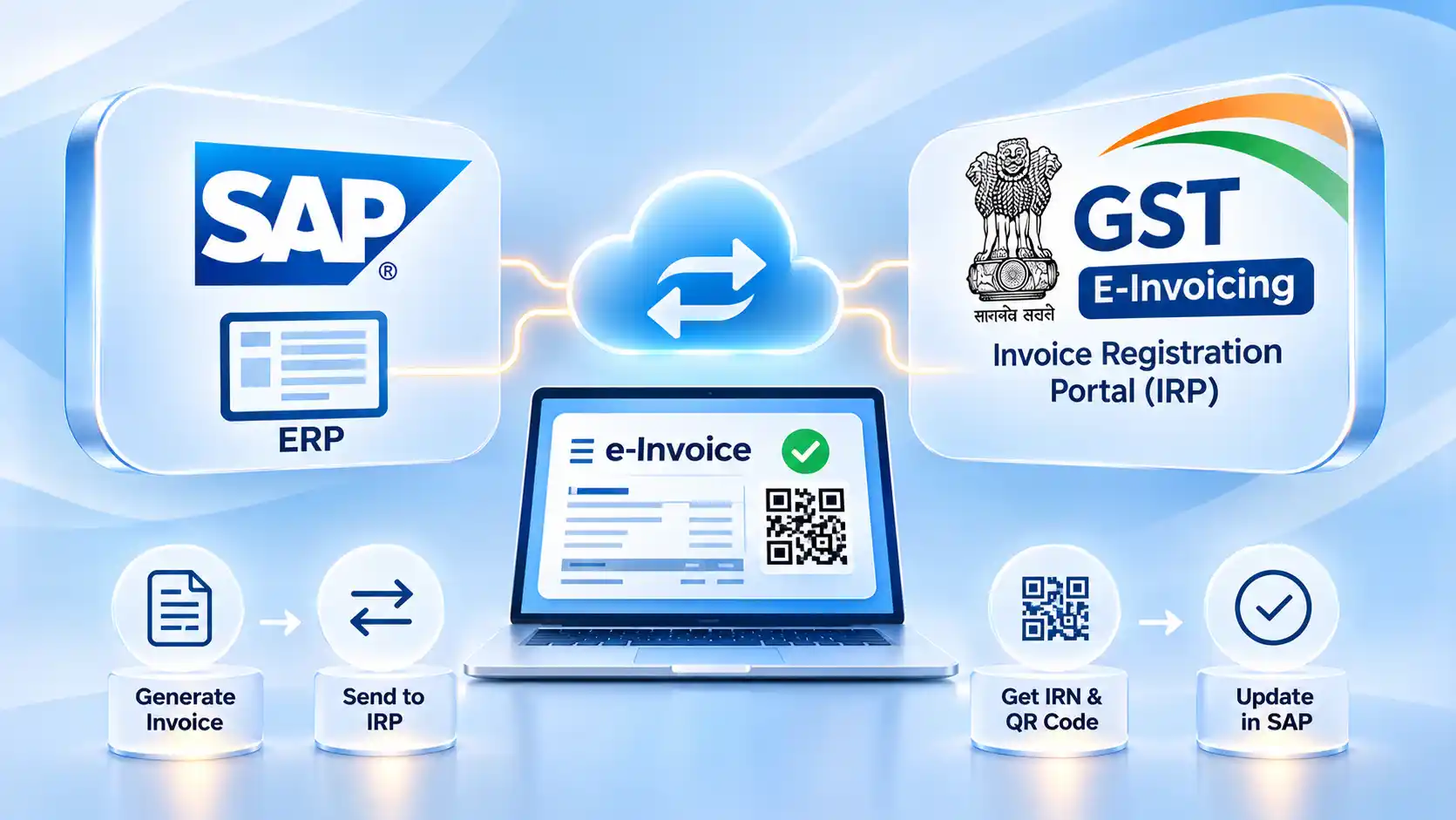
The integration process connects SAP with the Invoice Registration Portal (IRP) to validate invoices and receive the required registration details.
- A billing document is created and released in SAP.
- SAP, or the integration layer, builds the invoice payload using the format the portal requires.
- The payload is sent to the Invoice Registration Portal, directly or through an approved provider.
- The portal validates mandatory fields, tax details and duplicates.
- If valid, it returns an Invoice Reference Number, a signed invoice and a QR code.
- SAP stores these against the billing document and prints them on the invoice.
- Where goods move, the e-way bill can be generated using the registered invoice.
- Cancellations and credit notes follow their own rules and time limits.
Why the IRN Response Matters
The key point: the invoice is not final until the portal responds. Your process must wait for it, or handle a delayed response gracefully.
Integration Options for SAP GST E-Invoicing
Businesses can choose different integration approaches depending on their SAP landscape, billing complexity and compliance requirements.
| Option | How It Works | Good For | Watch Out For |
|---|---|---|---|
| SAP’s own compliance solution | SAP-provided content connects to the portal or a provider. | Companies on supported SAP versions wanting a vendor-supported path. | Version prerequisites and licensing. |
| Partner add-on | An add-on installed in SAP handles the full flow. | Fast rollout, standard processes. | Dependency on the partner’s roadmap. |
| Custom build on an integration platform | SAP Integration Suite maps, calls and monitors. | Complex processes, multiple ERPs, strong control needs. | Needs skilled design and maintenance. |
| Hybrid | Standard solution plus integration flows for exceptions and extra systems. | Large enterprises with varied landscapes. | Clear ownership of each part. |
Choosing the Right Integration Approach
There is no single right answer. Companies with one SAP system and standard billing often do well with a supported product. Companies with several ERPs, subsidiaries or non-SAP billing systems benefit from a central integration layer that gives every source the same compliance path.
Design Decisions That Matter
Synchronous or Asynchronous Integration
Billing staff need the reference number quickly. Design for a fast synchronous call, with an automatic retry queue when the portal is slow or unavailable.
Idempotency and Duplicate Prevention
If a request times out, you cannot be sure whether the portal registered the invoice. Your design must check before it resubmits, or you will create duplicates.
Master Data Validation Before Submission
Many rejections come from missing or malformed tax numbers, state codes, postal codes and units. Validate in SAP before the call, and give users clear messages.
Mass Processing and Performance
Month-end billing runs can send thousands of invoices in a short time. Test throughput and portal rate limits before go-live.
Cancellation and Amendments
Know the permitted cancellation window and build the process so that finance cannot cancel in SAP what the portal will no longer allow.
Archive and Audit
Keep the request, response and signed invoice together, retrievable by invoice number.
Handling SAP GST E-Invoicing Failures
Plan for failures at each step of the integration process.
Validation Rejection
Route the rejected invoice to the billing team with the exact portal error and a one-click path to fix the data.
Portal Downtime
Queue and retry invoices, and give users a status view instead of an error screen.
Credential or Certificate Problems
Alert the technical team before the billing run, not during it.
Late or Missing Response
Reconcile registered invoices against SAP daily to find gaps.
Daily Invoice Reconciliation
A daily reconciliation report that compares invoices in SAP with those registered on the portal is cheap to build and catches nearly every silent failure.
GST Rule Changes: Build for Flexibility
Indian tax technology evolves frequently. Changes to the e-invoice and e-way bill systems scheduled for August 2026, for example, were put on hold by a GSTN advisory at the end of July 2026. Keep the field mapping and validation rules configurable, not buried in code, so that a new field or limit is an update and not a project.
Why Configurable Integration Rules Matter
Configurable mappings and validation rules make it easier to respond to regulatory updates without rebuilding the entire integration. This also helps maintain consistency across multiple SAP systems and business entities.
Common Mistakes in SAP GST E-Invoicing Integration
- Treating it as a tax-team problem, then discovering it needs IT capacity.
- No retry design, so a short portal outage stops all billing.
- Testing with a handful of invoices and failing at month-end volume.
- Letting each plant or subsidiary build its own connection.
- Forgetting inbound invoices and reconciliation with supplier-reported data.
Frequently Asked Questions
Do We Need a Separate System for E-Invoicing?
Not necessarily. You need a compliant connection. It can be a vendor-supported SAP solution, a partner add-on or an integration platform.
Can SAP Integration Suite Be Used for GST E-Invoicing?
Yes. It can map invoices to the required structure, call the portal or a provider, handle retries and give you monitoring in one place.
What Happens If the Portal Is Down During Billing?
A well-designed flow queues the invoices and retries. Users should see a clear pending status.
Does GST E-Invoicing Integration Apply to ECC and S/4HANA?
Yes. The integration pattern is similar, and your options depend on the SAP version.
How Long Does an Implementation Take?
A standard single-company rollout typically takes six to twelve weeks, including testing. Complex multi-entity landscapes take longer.
Who Owns the Integration After Go-Live?
Shared ownership works best: finance owns the rules and IT owns the interface and monitoring.
Talk to Technolize
Technolize is based in Pune and builds SAP integrations for Indian and global enterprises. If you need to connect SAP to the GST e-invoice system or fix an unreliable connection, book a consultation and we will review your billing process and propose a design.