Introduction
Sales and customer service teams need accurate information to respond to customers, prepare quotations, confirm orders, and resolve service issues. However, when customer-facing applications operate separately from enterprise resource planning (ERP) systems, teams may rely on manual data entry, spreadsheets, and repeated communication with other departments.
SAP Sales Cloud and SAP Service Cloud help manage customer-facing activities. SAP ERP and SAP S/4HANA support core business processes such as customer master data, product information, pricing, sales orders, and other operational transactions.
SAP Sales and Service Cloud integration connects these systems so that customer-facing teams can work with relevant business information without repeatedly switching between applications or manually transferring data. SAP provides integration approaches for connecting Sales and Service Cloud Version 2 with SAP S/4HANA and SAP ERP, although the available scenarios depend on the products and deployment models involved. SAP Help Portal
For enterprise IT leaders, the objective is not simply to connect two applications. It is to create reliable workflows across sales, service, and back-office operations.
What Is SAP Sales and Service Cloud Integration?
SAP Sales and Service Cloud integration is the process of exchanging relevant master data and business transactions between SAP’s customer-facing cloud applications and enterprise systems such as SAP S/4HANA or SAP ERP.
The integration helps sales representatives access relevant customer and product information, supports the movement of sales documents between systems, and enables service teams to work with the business information required for customer support.
Typical integration areas include:
- Customer, account, and business partner data
- Product and product group information
- Sales quotations and sales orders
- Pricing information where supported
- Service-related information and supported service transactions
- Organizational data and other reference information
- Customer and transaction updates required by connected workflows
The exact integration scope must be defined for the selected SAP products and business processes. Not every integration package supports every transaction or operates in both directions.
Why Do Enterprises Need SAP Sales and Service Cloud Integration?
Many enterprises use separate applications for customer relationship management, service management, and core business operations. Without reliable integration, important information can become inconsistent across these systems.
Consider a sales representative preparing a quotation. The representative needs accurate product details, customer information, and applicable pricing. Once the quotation is accepted, the business may need to create a corresponding sales order in SAP S/4HANA or SAP ERP.
If the process depends on manual updates, it can introduce errors and unnecessary delays.
Integration can help address these problems in several ways.
1. Reduce manual data entry
When supported data flows are automated, teams do not need to re-enter the same customer, product, or transaction information across multiple applications.
This reduces repetitive work and helps improve data consistency.
2. Improve sales visibility
Sales teams can access relevant information from connected enterprise systems, depending on the configured integration scope. This helps representatives prepare quotations and coordinate with order management teams.
3. Connect customer service with business operations
Service teams may need product, customer, contract, or other operational information to investigate customer issues. Integrating relevant data can reduce the effort required to locate information across separate systems.
4. Improve customer data consistency
When customer and business partner information is maintained in multiple applications, inconsistent identifiers and outdated records can create operational problems.
A defined master data strategy and controlled replication process help reduce these risks.
5. Support end-to-end business processes
Integration connects customer-facing activities with back-office execution. For example, a sales quotation can lead to a sales order in the ERP system when the selected products, configuration, and business process support that flow. SAP documents this scenario for its managed integration offering for SAP S/4HANA Cloud Public Edition and SAP Sales Cloud Version 2. SAP Help Portal
Which SAP Systems Can Be Connected?
The appropriate integration design depends on the systems already used by the enterprise.
SAP Sales Cloud and SAP S/4HANA
This combination supports sales processes that need to exchange customer, product, and transaction information with SAP S/4HANA.
Depending on the selected integration scope, use cases can include master data replication, sales order exchange, and pricing-related processes.
SAP provides integration documentation for SAP Sales Cloud and SAP Service Cloud Version 2 with SAP S/4HANA, including configuration and master data scenarios. SAP Help Portal
SAP Sales Cloud and SAP ERP
Enterprises operating SAP ERP can integrate supported customer-facing sales processes with their existing ERP environment.
The implementation must account for ERP release requirements, installed components, master data synchronization, and available interfaces. For example, SAP’s documentation specifies prerequisites for integrating Version 2 with SAP ERP, including release-dependent business partner replication capabilities. SAP ERP integration guide
SAP Service Cloud and SAP S/4HANA
Service Cloud integration can connect customer service workflows with relevant ERP information and supported service processes.
Depending on the use case, the integration may involve business partner data, products, service contracts, or other supported transactions. The specific scope should be confirmed against the selected Service Cloud version and S/4HANA deployment.
SAP Sales Cloud and SAP Service Cloud together
Some enterprises use both applications to support sales and service operations. Their integration strategy should define how customer information, product data, and relevant business processes are shared across the applications and connected back-office systems.
The goal is to maintain a consistent customer experience without creating duplicate or conflicting data ownership.
Common Business Processes That Benefit From Integration
The most effective SAP integration projects begin with business processes rather than a list of technical interfaces.
Customer and business partner synchronization
Customer information is often required across sales, service, and ERP operations. Integration can replicate supported business partner data so that connected systems use consistent customer identifiers and relevant attributes.
Before implementation, define which system owns each field, how new records are created, and how changes are synchronized.
Product information synchronization
Sales and service teams need accurate product information to discuss offerings, prepare quotations, and support customers.
Product replication from SAP S/4HANA to Sales and Service Cloud Version 2 is one of the scenarios covered in SAP’s integration learning material. SAP Learning
The implementation should specify which product attributes are required, how updates are handled, and how inactive or discontinued products are treated.
Sales quotation and order processing
Sales teams may prepare quotations in Sales Cloud while the ERP system handles order execution and related back-office processes.
A supported integration can connect the quotation and order lifecycle, reducing the need for manual re-entry. However, quotation conversion, pricing calculation, order replication, and order-status updates are separate functions that must be verified against the chosen integration scope.
Pricing and product availability
Sales representatives often need current pricing and relevant product information before committing to a customer.
Where supported, integration can enable pricing-related interactions with the ERP system. The design should identify which system calculates the final price, how discounts and taxes are handled, and whether product availability is replicated or queried at runtime.
Do not assume that all pricing and availability information is automatically real-time simply because the systems are connected.
Customer service and service-related processes
Service teams may need customer, product, contract, or service transaction information from connected business systems.
Integration can make selected information available across the service process. The precise scope depends on the applications in use and the supported interfaces, so requirements should be validated before committing to a particular workflow.
How Does SAP Sales and Service Cloud Integration Work?
A typical integration architecture contains three main layers.
1. Customer-facing applications
SAP Sales Cloud supports sales activities, while SAP Service Cloud supports customer service workflows.
These applications provide the operational interface for the relevant teams.
2. Integration layer
SAP Integration Suite, including its Cloud Integration capability, can act as middleware between the connected systems. It can process messages, map data between formats, and route information between applications.
SAP provides integration packages and integration flows for specific Sales and Service Cloud Version 2 scenarios with SAP S/4HANA. The available package must match the intended backend and product version. SAP Learning
3. ERP and back-office systems
SAP S/4HANA or SAP ERP can provide the relevant master data and execute supported business transactions.
The architecture must also account for connectivity, authentication, message monitoring, error handling, and the operational responsibilities of each team.
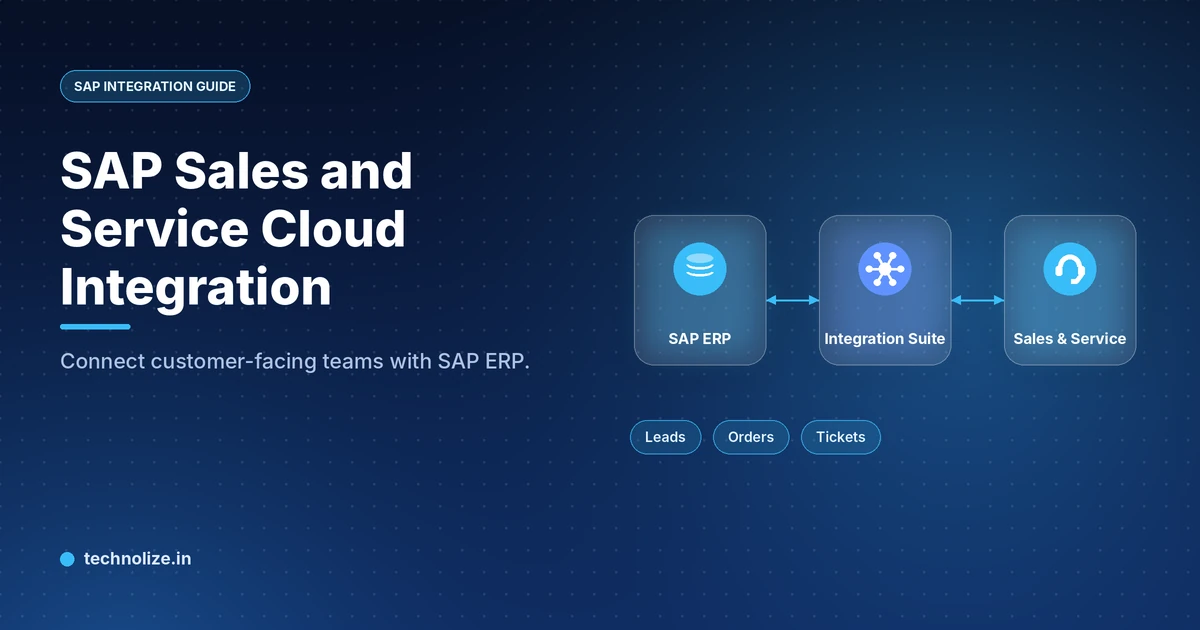
A simplified flow looks like this:
SAP Sales Cloud / SAP Service Cloud → SAP Integration Suite → SAP S/4HANA or SAP ERP
The actual architecture may vary. Some SAP S/4HANA Cloud Public Edition customers may be eligible for a managed integration setup, while other deployments require customer-managed configuration and operations. The appropriate approach depends on the contractual arrangement, product version, and integration requirements.
What Is the Role of SAP Integration Suite?
SAP Integration Suite can provide the middleware capabilities needed to connect cloud applications with SAP and non-SAP systems.
For Sales and Service Cloud integration projects, it may support the following responsibilities:
Data transformation: Maps data fields and formats between source and target applications.
Message routing: Sends business messages to the appropriate target systems.
Integration flow execution: Runs configured flows for supported data replication and transaction scenarios.
Connectivity: Supports communication between cloud applications and eligible backend environments.
Monitoring and troubleshooting: Helps technical teams investigate failed messages and processing issues.
Reusable integration patterns: Allows teams to apply consistent approaches across related integration scenarios.
SAP’s integration documentation includes configuration, data replication, and monitoring procedures for Sales and Service Cloud Version 2 with SAP S/4HANA. SAP Help Portal
The platform alone does not guarantee a successful integration. Correct configuration, mapping, business rules, access controls, and operational ownership remain essential.
Key Challenges in SAP Sales and Service Cloud Integration
Integration projects often encounter problems when business requirements and technical design are handled separately.
Inconsistent customer records
Different systems may use different identifiers or maintain different customer attributes.
How to address it: Establish a clear master data ownership model, define matching rules, and test how new and updated records are replicated.
Incorrect field mapping
A field in one application may have a different meaning, format, or allowed value in another.
How to address it: Document field mappings, required fields, transformation rules, and value mappings before developing the integration flows.
Unclear pricing ownership
Sales teams may expect pricing in the cloud application to match ERP calculations, even when the pricing logic or configuration differs.
How to address it: Define the pricing source, supported calculation process, currency handling, discount rules, and tax responsibilities.
Duplicate transactions
Retrying failed messages without suitable controls can create duplicate records or repeated processing.
How to address it: Define retry policies, error queues or equivalent recovery procedures, and duplicate-handling rules appropriate to each transaction.
Connectivity and authentication issues
Certificates, communication users, permissions, and network configuration can prevent messages from reaching their destinations.
How to address it: Validate connectivity and authentication early, document certificate ownership, and establish a process for renewals and access reviews.
Limited monitoring and support ownership
An integration may work during testing but fail later because no team is responsible for identifying and resolving production issues.
How to address it: Assign clear ownership for monitoring, incident triage, failed-message recovery, and communication with business users.
A Practical Implementation Roadmap
A structured implementation helps reduce rework and gives business and IT teams a shared view of the project.
Step 1: Assess the existing system landscape
Identify the Sales Cloud and Service Cloud versions, ERP or S/4HANA deployment model, connected applications, and existing integration middleware.
Confirm the releases and technical prerequisites before selecting an integration approach.
Step 2: Define business requirements
Document the business processes that need integration, such as customer synchronization, product replication, sales quotations, order processing, or service-related workflows.
Prioritize the use cases according to business value and operational risk.
Step 3: Establish data ownership
Identify the system of record for each major data object. Define how customer, product, organizational, and transaction data should be created, updated, and synchronized.
Step 4: Select the integration architecture
Determine whether the project should use an eligible SAP-managed integration setup, customer-managed integration flows, or another supported approach.
Validate the required integration packages, APIs, interfaces, connectivity, and deployment-specific constraints.
Step 5: Configure and develop the integration
Set up communication arrangements, authentication, mappings, integration flows, and required business configuration.
Keep custom development limited to requirements that cannot be met through the supported standard scope.
Step 6: Test end-to-end business scenarios
Testing should cover successful processing, missing or invalid data, duplicate messages, access failures, retries, and recovery.
Validate both the technical message flow and the resulting business document in the target system.
Step 7: Prepare monitoring and production support
Define monitoring responsibilities, alert thresholds, incident escalation, error recovery, and operational documentation.
Ensure the support team knows how to investigate failures across both applications and the integration layer.
Step 8: Roll out in controlled phases
Where practical, begin with a limited business process or organizational scope. Validate the results, resolve issues, and expand to additional workflows once the integration is stable.
Best Practices for a Reliable Integration
Enterprises should apply the following principles throughout implementation and ongoing operations:
- Start with clearly defined business outcomes rather than integrating every available data object.
- Use supported standard integration content where it meets the requirements.
- Establish a single source of truth for each critical data object.
- Define field mappings and value transformations before development.
- Test transaction failures and recovery, not only successful scenarios.
- Apply least-privilege access and appropriate authentication controls.
- Monitor message processing and assign responsibility for failed integrations.
- Document custom logic, configuration, and operational procedures.
- Validate compatibility across product versions and deployment models.
- Review integration performance and business outcomes after go-live.
How to Choose an SAP Sales and Service Cloud Integration Partner
An integration partner should understand both SAP technology and the business processes that connect sales, service, and ERP operations.
Before selecting a partner, enterprise IT leaders should evaluate:
SAP product expertise: Experience with the relevant Sales Cloud, Service Cloud, SAP ERP, and SAP S/4HANA versions.
SAP Integration Suite experience: Ability to configure and operate integration flows, mappings, connectivity, and monitoring.
Business process understanding: Knowledge of customer master data, sales quotations, order processing, pricing, and relevant service workflows.
Data governance: A clear approach to master data ownership, data quality, and synchronization rules.
Testing methodology: Evidence of end-to-end testing, exception handling, and recovery validation.
Production support: Defined monitoring, escalation, troubleshooting, and knowledge-transfer procedures.
Documentation: Clear architecture diagrams, mapping specifications, configuration records, and support documentation.
Ask potential partners to explain how they would handle a real business scenario, such as synchronizing customer records and connecting a sales quotation to an ERP sales order. Their response should cover business rules, supported integration scope, failure handling, testing, and operational ownership—not just the middleware configuration.
Frequently Asked Questions
What is SAP Sales and Service Cloud integration?
It connects SAP’s sales and customer service applications with ERP and other enterprise systems so that relevant customer data, product information, and supported business transactions can be exchanged across applications.
Can SAP Sales Cloud integrate with SAP S/4HANA?
Yes. SAP documents integration scenarios between SAP Sales Cloud Version 2 and SAP S/4HANA. The available scenarios and setup responsibilities depend on the deployment model and selected integration scope.
Can SAP Service Cloud integrate with SAP ERP?
Yes. SAP documents integration between SAP Sales and Service Cloud Version 2 and SAP ERP, subject to release requirements, prerequisites, and the supported integration scenarios.
Is SAP Integration Suite required?
The integration architecture depends on the specific products, deployment model, and supported integration approach. SAP Integration Suite is used for documented customer-managed integration scenarios, while certain eligible SAP S/4HANA Cloud Public Edition customers may have access to SAP-managed integration setup services.
Which data can be synchronized?
Depending on the integration scenario, this may include business partner data, products, organizational information, sales orders, pricing-related information, and supported service-related data. The exact scope must be confirmed for the selected products and backend systems.
Does integration provide real-time data?
Some integration scenarios support real-time interactions, while others use replication, scheduled processing, or asynchronous messaging. The design should specify the required data freshness and validate the supported behavior for each interface.
How long does implementation take?
There is no universal timeline. Duration depends on system readiness, integration scope, data quality, custom requirements, security approvals, testing complexity, and the number of business processes involved. A technical assessment is needed to estimate the project accurately.
What is the difference between SAP Sales Cloud and SAP Service Cloud integration?
Sales Cloud integration primarily supports sales-related processes, while Service Cloud integration supports customer service workflows. Both may share master data and connect to ERP systems, but their transaction requirements and integration scope differ.
Final Thoughts
SAP Sales and Service Cloud integration helps enterprises connect customer-facing teams with the business systems responsible for executing sales and operational processes. When designed around clear data ownership, supported integration scenarios, and reliable monitoring, it can reduce manual work and improve consistency across sales, service, and ERP operations.
The most effective approach is to begin with a small set of high-value business processes, validate the technical prerequisites, and build a scalable integration model that can support additional requirements over time.
Technolize helps enterprises plan and implement SAP integration solutions using SAP Integration Suite and related SAP technologies. For organizations evaluating Sales and Service Cloud integration, the first step is to assess the existing landscape, confirm the supported integration scope, and define a practical implementation roadmap.